18 January 2026:
Sahi Pro is an enterprise grade test automation platform which can automate web, mobile, API, windows and java based applications and SAP.
This forum is now archived and is in read-only mode. Please continue discussions on our improved new Sahi Pro Community forum.
Sahi Pro is an enterprise grade test automation platform which can automate web, mobile, API, windows and java based applications and SAP.
How to build Sahi using NetBeans IDE
 StringyLow
Members
StringyLow
Members
This method of building the Sahi Proxy is from a Windows perspective but since NetBeans is platform independent, the only differences are the way directories are handled.
Sahi Build Instructions
Here's how to build Sahi on your own machine using the NetBeans IDE.
Download the pre-requisites:
1. Java JDK (Java Development Kit) and NetBeans. You can get them here:
http://java.sun.com/javase/downloads/netbeans.html
Install the tools
1. Install the Java JDK and NetBeans
Get the Sahi Source Code
1. Run NetBeans
2. Click on "Versioning" in the menu bar
3. Select Subversion → Checkout
4. Enter "https://sahi.svn.sourceforge.net/svnroot/sahi" as the Repository URL.
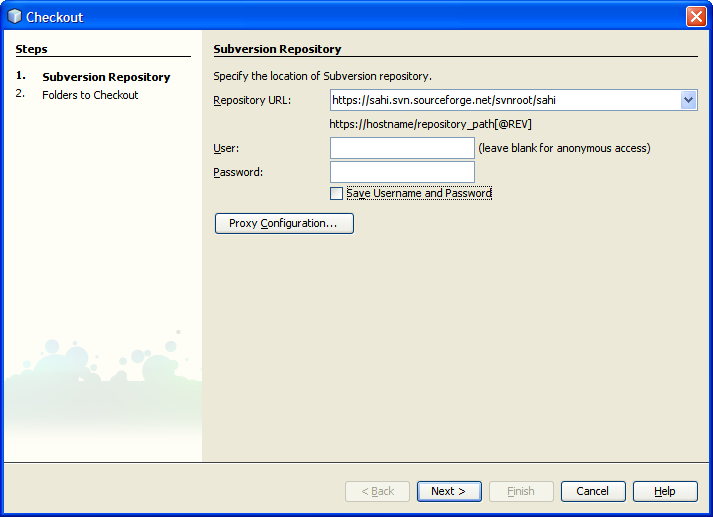
5. Click the "Accept Permanently" button when the prompt about the SSL certificate appears,
6. Click Next
7. Wait for NetBeans to connect to the Sahi Subversion repository
8. Click the "Browse" button on the "Folder to Checkout" dialog
9. Select "Trunk → Sahi
Sahi Build Instructions
Here's how to build Sahi on your own machine using the NetBeans IDE.
Download the pre-requisites:
1. Java JDK (Java Development Kit) and NetBeans. You can get them here:
http://java.sun.com/javase/downloads/netbeans.html
Install the tools
1. Install the Java JDK and NetBeans
Get the Sahi Source Code
1. Run NetBeans
2. Click on "Versioning" in the menu bar
3. Select Subversion → Checkout
4. Enter "https://sahi.svn.sourceforge.net/svnroot/sahi" as the Repository URL.
5. Click the "Accept Permanently" button when the prompt about the SSL certificate appears,
6. Click Next
7. Wait for NetBeans to connect to the Sahi Subversion repository
8. Click the "Browse" button on the "Folder to Checkout" dialog
9. Select "Trunk → Sahi
Comments
This is how we can build from svn. I have downloaded the source. How can i build from the local copy of the source code?
I tried it but at step "Add the required class libraries to the project" I couldnt find the mentioned .jar files in extlib...
Regards,
Pankaj.
Sahi Source\src\net\sf\sahi
The source download does not have the external libraries included. You'll have to download them separately:
mail.jar
http://java.sun.com/products/javamail/downloads/index.html
ant.jar
http://ant.apache.org/bindownload.cgi
jmock.jar
http://www.jmock.org/download.html
log4j.jar
http://www.jmock.org/download.html
xmlrpc.jar
http://ws.apache.org/xmlrpc/download.html
I'd advise putting them some place easy to remember, like your Java directory.
** EDIT**
The Sahi source code downloads now includes these files in the "extlib" directory